Live hardware readback
Read the current XD sound and keep mapped plugin controls in sync with physical knob changes while editing remains active.
24REC DEVICE 09 / v0.2.4
minilogue xd MIDI Controller / Editor
24XD midilogue connects your Korg minilogue xd to a tactile DAW editor. Shape sounds with the plugin or the hardware, follow incoming control changes on screen, and play the synth from your Piano Roll. The sound comes from your connected minilogue xd.
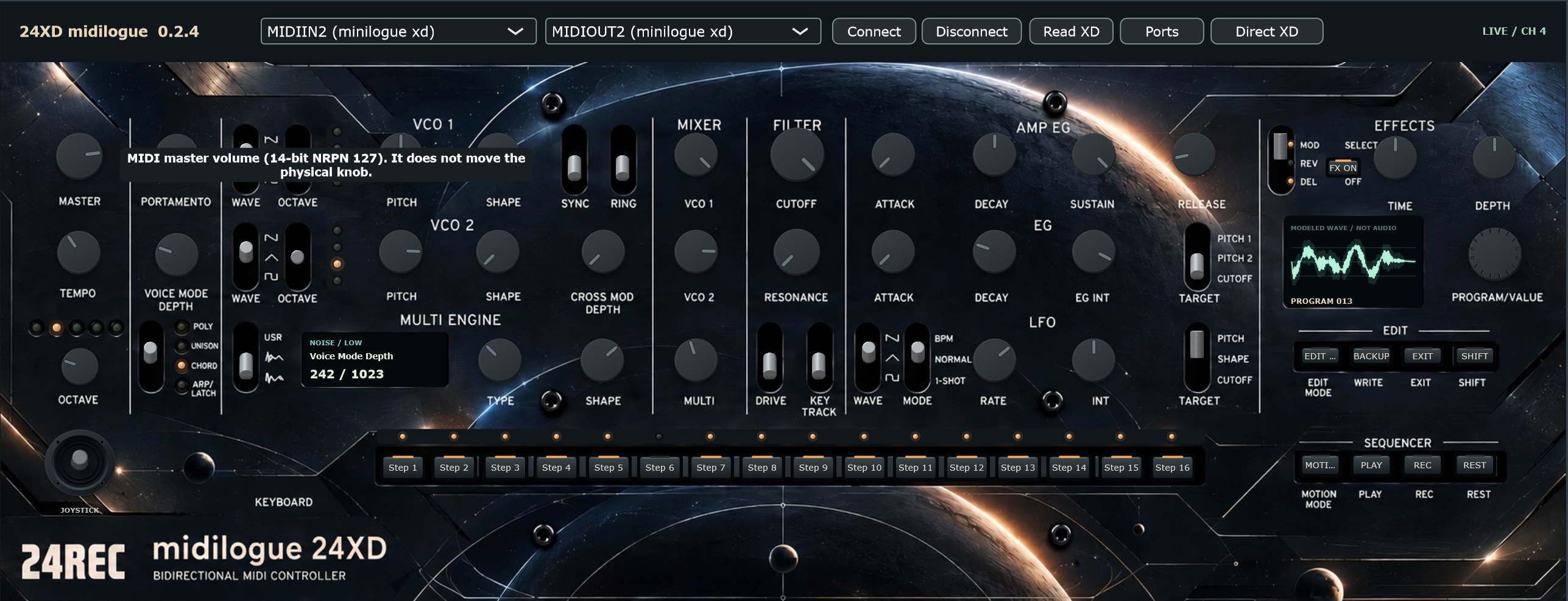
Read the current XD sound and keep mapped plugin controls in sync with physical knob changes while editing remains active.
Oscillators, MULTI ENGINE, filter, envelopes, LFO and effects share a panel with lit switches, a joystick and descriptive parameter readouts.
Select MIDI ports explicitly or use Direct XD to choose the synth-control pair. Resolved Windows port names stay visible.
Browse programs with the endless Program/Value encoder and forward Piano Roll notes, velocity, sustain and pitch bend.
Control step enable states, motion options and transport. Playback requires compatible hardware clock settings and transport reception enabled.
A modeled waveform visualizes parameter settings; it is not captured audio. Backup saves a SysEx file without overwriting a hardware preset.
From input to intent
Windows x64 / VST3
01 Download and extract the ZIP archive.
02 Copy the complete .vst3 folder to C:\Program Files\Common Files\VST3\.
03 Restart your DAW and rescan VST3 plugins if needed.
04 The included standalone application can run without DAW installation.
Requires a Korg minilogue xd and a hardware audio connection. The waveform is a visual model, not audio monitoring. Backup saves to a file rather than writing an XD preset. Independent software by Marko Damjanovic / MARCOD, not affiliated with or endorsed by Korg.